Reading widgets for your iPhone Home Screen
A book you cannot see is a book you forget you were reading. A reading widget puts the cover, the progress and the streak where you already look forty times a day, which turns out to be most of what a reading habit needs.
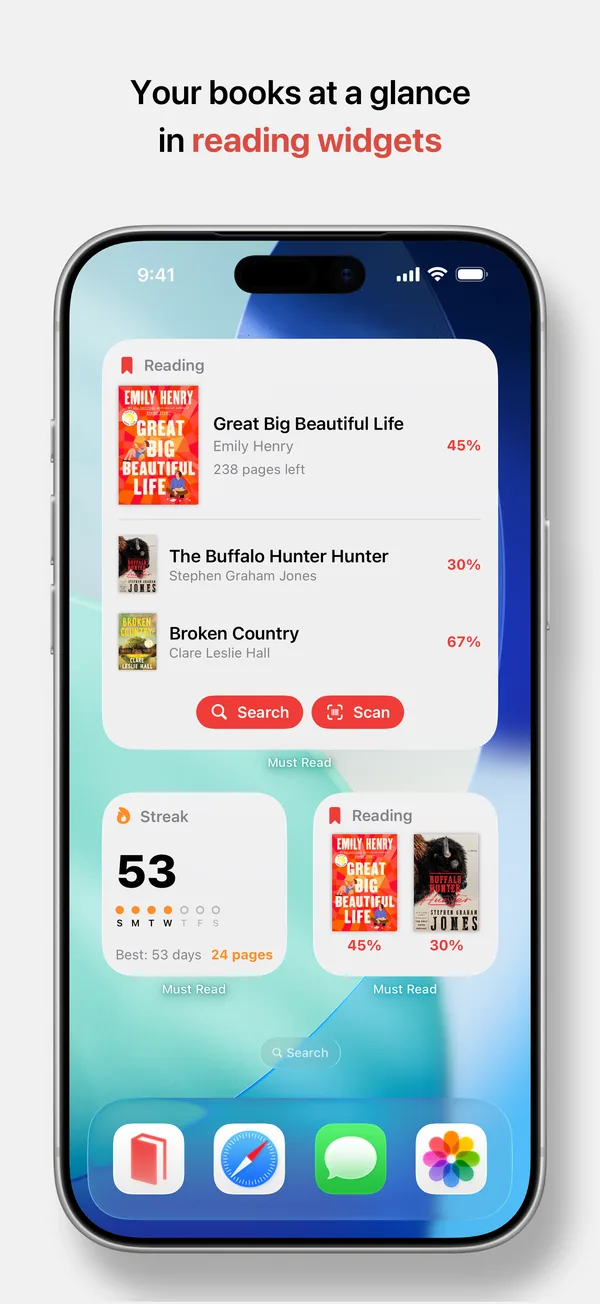
What a reading widget can show
Must Read has two, and they answer different questions. The Reading widget answers "what am I in the middle of": covers, titles and how far through each one you are. The Streak widget answers "have I read today": your flame, the days you read this week, and today's pages. Between them there is no need to open the app to know where you stand.
Pick the size for the job
Every size is available, and the size changes what the widget is for:
- Small – one book, its cover and its progress. The quiet reminder.
- Medium and Large – several books at once, with progress on each. The one to use if you always have three on the go.
- Extra Large on iPad – the whole bookshelf of what is in progress, legible from across the desk.
- Lock Screen – progress or streak without unlocking anything at all.
Choose which books appear
A widget that shows the wrong book is worse than no widget. You can choose exactly which books yours displays and in what order, so the novel you are actually reading sits above the reference book you dip into twice a month. Covers update as you go, so progress moves without you touching the widget.
Shortcuts, not just a display
The widget carries Search and Scan shortcuts, so adding a book is one tap from the Home Screen rather than a trip through the app. That matters most in a bookshop, which is exactly where you are least likely to open a tracker.
Ask Siri instead
When your hands are full, the same information comes by voice: ask what you are reading, which of your books you rated highest, or how your reading stats look. You can also add, finish and rate books by voice. Adding a widget itself is the standard iOS gesture – touch and hold the Home Screen, tap the plus, search for Must Read.
Quick answers
Is there a reading streak widget?
Yes. It shows your current streak, which days you read this week, and the pages you have read today.
Can I put a reading widget on the Lock Screen?
Yes, so your current book or your streak is visible without unlocking the phone.
Do widgets work on iPad?
They do, including an Extra Large size that shows more of your library at once.
Put your current book on your Home Screen
- Free for your first 10 books
- Reading timer & Live Activity
- Stats, goals & streaks